Sliders vs. Precision: Why MDS chooses number inputs
TLDR
- MDS intentionally does not include slider or range‑slider components.
- Sliders only work in narrow cases where approximate values are acceptable and ranges are small.
- For range filtering, paired min/max number inputs are faster, more precise, more accessible, and more reliable across devices.
- In data‑heavy logistics workflows, the interaction cost of sliders outweighs their visual appeal.
The context
Teams occasionally request sliders for filtering values such as weights, costs, or quantities — sometimes across ranges as large as 1 to 100,000. After reviewing our previous research, other design systems, and real product use cases, our conclusion is consistent:
Sliders do not support the precision and accessibility requirements of logistics applications.
What the research shows
Long‑standing usability studies (NNGroup, Baymard, Smashing Magazine) point to the same issues:
- Low precision:
Users struggle to land on exact values, especially on touch devices. - High motor demand:
Dragging requires fine motor control, creating direct accessibility barriers and risks. - Dual-handle confusion:
Many users misinterpret two‑handle sliders; the interaction model is not intuitive. - Large ranges break down:
On a 300‑pixel track from 1 to 100,000, a single pixel represents ~333 units - precision becomes impossible. - Uneven distributions worsen things:
Logistics data typically clusters; non-linear scales confuse users. - Poor keyboard/screen reader support:
Stepping through large values is slow and inconsistent compared to typing.
Why sliders fall short in logistics
Logistics interfaces demand speed, accuracy, and clarity.
- Users usually know the value they want, they’re not exploring.
- Ranges are large and uneven.
- Errors are costly (e.g., excluding shipments by mistake).
- Filter panels have limited horizontal space; sliders require generous width to work at all.
In these conditions, sliders slow users down and introduce unnecessary uncertainty.
What to use instead
Paired min/max number inputs (recommended)
The Maersk Design System recommends paired min/max number inputs for numeric range filtering.
Why they work
- Users enter exact values quickly.
- Consistent across mouse, touch, keyboard, and assistive tech.
- Works for any range size.
- Fits well in filter panels.
Built‑in accessibility from native number inputs.
Optional enhancements
- Filter chips showing the applied range.
- Preset buttons for common values.
- Optional distribution indicators when patterns matter.
Preset range options as a select pattern
When there are meaningful brackets and clustered data we recommend using select type of controls with preset ranges. This way users can quickly navigate and choose the ranges. Combine with a “Custom range” option (number input) when needed.
Example alternatives
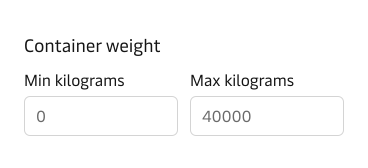
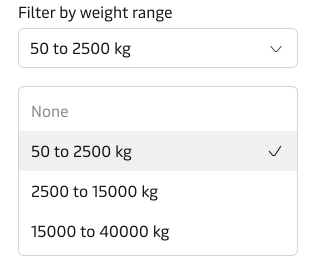
Closing thoughts
Not every attractive component belongs in a design system. Sliders look modern, but they introduce precision and accessibility problems that conflict with the realities of enterprise logistics where mistakes can have a high cost.
For numeric ranges, paired number inputs offer a faster, more robust, and more inclusive experience, which is why MDS continues to standardise on them.