Agent & MCP Server
The MDS AI Agent brings together an MDS-focused AI agent, actionable instructions, skills, and reference documentation, so that you get code and advice aligned with MDS best practices without having to search through our documentation or guessing APIs.
Why it matters
Better grounding
Per-component references are the source of truth, so the agent can read them before generating imports, props, or event handlers.
Design-token first
Colours, spacing, typography, and borders flow through MDS design tokens.
Prefer MDS components
Skills steer common UI tasks away from raw button, select, and dialog markup and toward the mc-* equivalents.
Shared guidance
Instructions and skills help teams use the same MDS patterns across projects.
What’s included in the package
The package consists of the following knowledge layers:
Agent
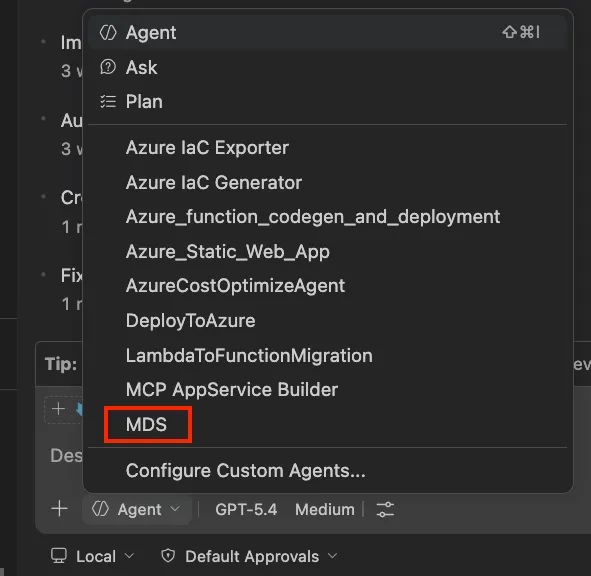
Select the @mds agent in Copilot chat for a focused MDS expert that prioritizes MDS references and enforces all design system rules.
Instructions
Always-on rules for React, Vue, Angular, and general UI files. Prevents invented components, enforces design tokens, and guides correct usage.
Skills
Task-oriented guides (e.g., /mds-form, /mds-layout, /mds-tokens) for setup, accessibility, forms, icons, layout, data tables, dialogs, navigation, tokens, and feedback.
Reference Markdown
Bundled docs for every skill, with exact component APIs, design tokens, and usage patterns.
Quick start
This copies the agent, instructions, skills, and bundled references into your .github folders. If you prefer manual setup: copy files from the package to your .github folders as needed.
You can now select the MDS agent in Copilot chat and ask it anything:
Keeping up to date
Run the “update” command after updating MDS to get the latest instructions and skills:
How it all connects and example prompts
- You ask: “Build a registration form”
- Agent: focuses on MDS, opens relevant references
- Instructions: guide correct component and token usage
- Skills: provide step-by-step help for forms, layout, etc.
- References: opened as needed for exact APIs and examples