Understanding how digital interfaces appear across different devices is key to designing responsive and accessible experiences using the grid and breakpoints. Devices vary widely in physical screen size, pixel density, and how they report screen dimensions to browsers and operating systems.
This overview of common Maersk devices and their typical resolutions inform your layout decisions, breakpoint strategy.
Common Maersk devices
All Maersk employees are issued standard devices with different screen specifications
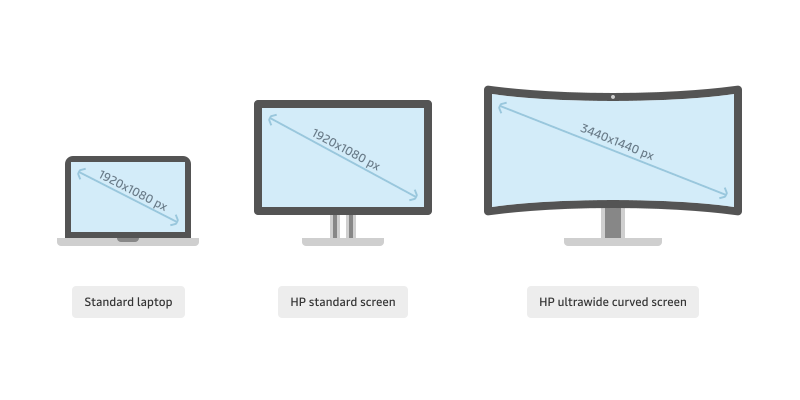
| Device | Screen res. (px) | Default scale factor | Logical res. (px) |
|---|---|---|---|
HP Elitebook 840 G8 14” | 1920 x 1080 | x1.25 | 1539 x 864 |
MacBook Pro 13” M2 | 2560 x 1600 | x2 | 1280 x 800 |
MacBook Pro 14” M2 | 3024 x 1964 | x2 | 1512 x 982 |
MacBook Pro 16” M2 | 3456 x 2234 | x2 | 1728 x 1117 |
HP 23” | 1920 x 1080 | - | - |
Samsung / Lenovo ThinkVision 34” | 3440 x 1440 | - | - |
Samsung A52 6.5” | 1080 x 2400 | x3 | 360 x 800 |
iPhone SE 4.7” | 750 x 1334 | x2 | 375 x 667 |


NB: The default scale factor for monitors is determined by the device connecting to the monitor.
Hardware pixels
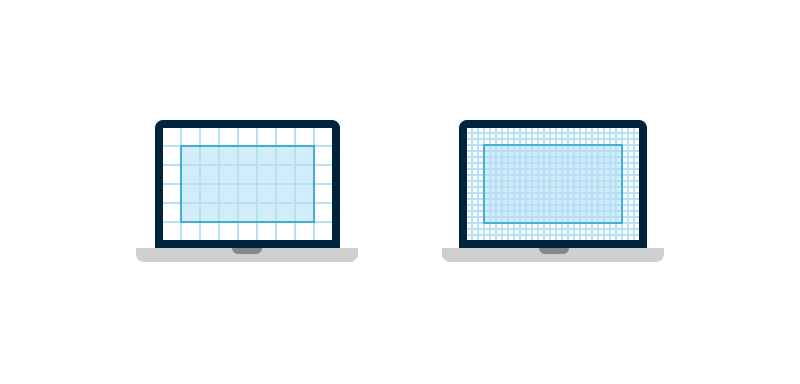
Hardware pixels are the actual light generating dots that are fitted into the physical dimensions of a screen. The more hardware pixels a screen has, the finer and more detailed an image can be.

Logical pixels
Logical pixels are relevant when the operating system uses a scaling factor to manage how content is rendered on high-density displays e.g. Retina displays. Using more hardware pixels for each logical pixel increases the perceived visual sharpness and detail.
How to design for hardware and logical pixels
- Design for the logical pixel resolutions, thats what users will be experiencing.
- Use high quality images that are exported for the relevant scaling factor, so there is no loss in sharpness.
- Use scalable vector graphics (SVG). They can scale no matter what scaling factor is applied and will keep optimal sharpness.