The Maersk Design System content grid provides structure and consistency across responsive layouts. It helps align components and content within the main area of a page. It allows designers and developers to ensure clarity, predictability, and balance on any screen size.
The grid has been designed to be responsive to our defined breakpoints and aligned with the spacing design language.
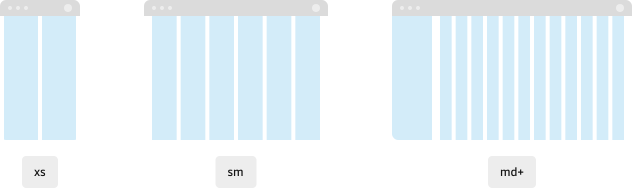
Grid overview
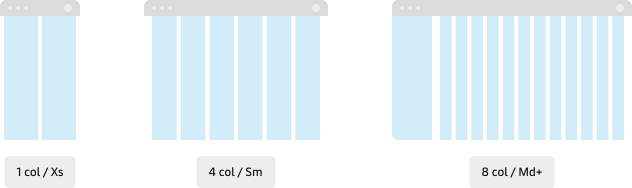
The content grid adapts across parent container breakpoints with a consistent visual rhythm while scaling the number of columns to fit the available width.
| Grid Columns | Container breakpoint | Width (px) | Gap (px) | Context |
|---|---|---|---|---|
| 2 | xs | 0-640 | 16 | Mobile layouts, stacked content. |
| 6 | sm | 641-1024 | 24 | Two to three column layouts. |
| 12 | md | 1025-1440 | Dashboards, dense multi-column views. | |
| lg | 1441-1920 | |||
| xl | 1921 + |
Using the grid
Use the grid to organise content within the main content area of the page. Avoid applying it to higher-level layout elements such as global navigation, drawers and asides or overlays. These elements often follow different layout rules and may not need to align to grid columns directly.
Get started by using the Templates that have the grid applied.
Aligning to columns
When laying out content on the grid, it is acceptable to span multiple columns. Content containers must align to the start and end of columns and not use the gaps between columns.
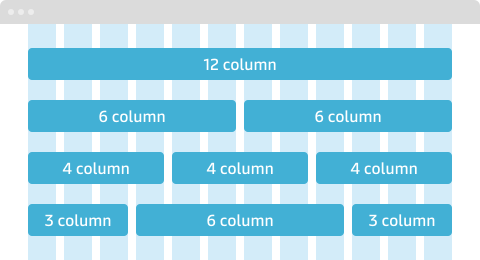
Alignment is relative. Child elements do not need to align to the same grid as the parent container. For example, icon buttons within a grid-aligned toolbar don’t need to align to the same grid.
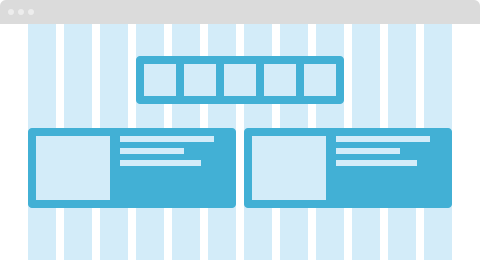
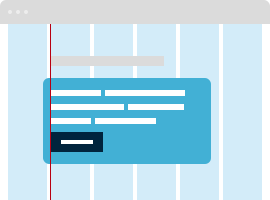
Containers with padding
Containers with padding should align to the grid by their outer edge—not by the edge of their content. Avoid offsetting padded containers just to align inner content to the grid.
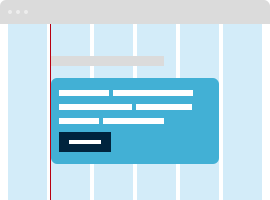
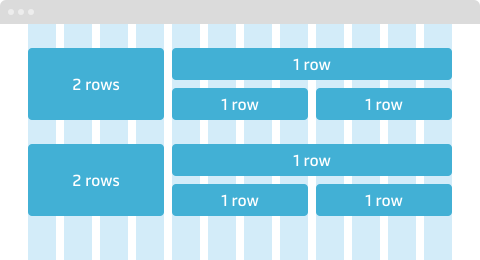
Row spanning
Content may span one or more rows to create visual groupings or accommodate flexible heights. Align vertically with care to maintain consistent spacing between content blocks.
Nesting grids
Avoid deeply nested grids. For simplicity, keep to a depth of 2-3 grids.
Customisation
Grid columns and the space between columns (gaps) can be customised to support specific layout needs. Before customising, consider whether the same can be achieved by spanning content across columns using the default grid configuration.
It is recommended to keep to the standard grid to ensures predictable behavior and better alignment across contexts.
Considerations
- Apply the grid within the main content area, not for navigation or drawers.
- Test how the design adapts across the different number of columns.
- Consider hiding UI elements when number of columns is reduced.
- Ensure that line-length is optimal when text container stretches across multiple columns.
- Check the screen resolutions of the Maersk Standard Devices if designing for internal products.
Resources
Design
Develop
Designers must select the corresponding grid style in Figma to match the frame width that is being used in the design. While for developers, this responsiveness is handled automatically with CSS container queries.