Anchored to the left of the viewport, the Side Bar is used primarily as the home for the Tree Navigation representing the main navigation for a site / application.
Viewport behaviour
Greater than 1024px wide
By default the Side Bar will be visible to the left of the viewport for medium, large and extra large breakpoints.
The Side Bar will not overlay the Top Bar or the Page regions.
The Side Bar can be toggled between a hidden and visible state by interacting with the “Toggle Side Bar” button in the Top Bar.
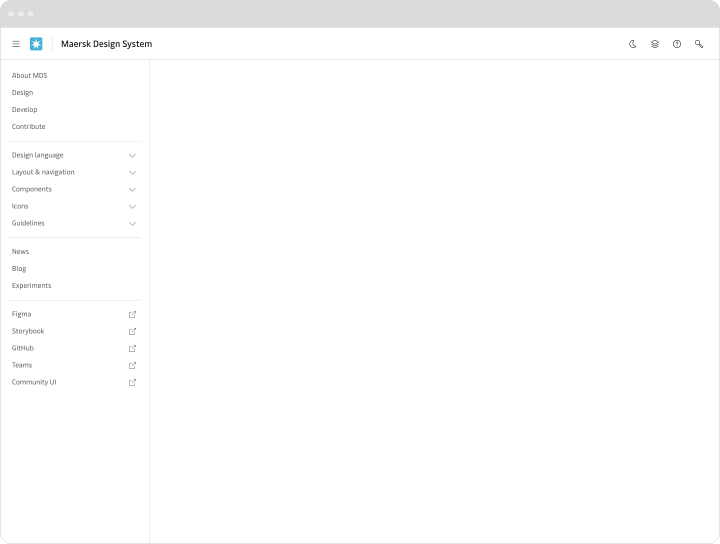
Side Bar when visible on viewports greater than 1024px wide (medium, large and extra large breakpoints).
Less than 1025px wide
By default the Side Bar will be hidden.
The Side Bar can be toggled between a hidden and visible state by interacting with the “Toggle Side Bar” button in the Top Bar.
When visible the Side Bar will overlay the Top Bar or the Page regions similar to the Drawer component.
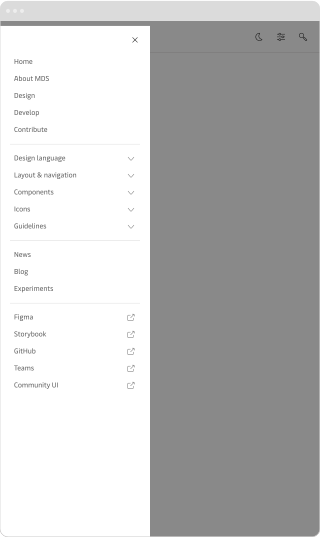
Side Bar when visible on viewports less than 1025px wide (small and extra small breakpoints).