Truncation
One way of making sure that long texts (especially those of variable length, such as localised and user generated text) don’t break the design or take up too much space is to truncate (shorten) it.
To let the user know that some of the text has been hidden, the truncated characters are replaced by an ellipsis (…). Allowing the user to access the entire text string by providing a tooltip on hover is recommended.
However, since truncation comes with the risk of hiding useful information from the user, it is always worth considering whether wrapping (letting the text break and continue on multiple lines) is a better alternative. Truncated text strings can be especially inaccessible on touch devices where providing a tooltip on hover is not an option.
Best Practice
- Provide a tooltip on hover that allows the user to read the entire text
- The ellipsis should represent three or more truncated characters
- There should be a minimum of four visible characters in a truncated text string
- Use the ellipsis with moderation making sure its meaning is consistent throughout
- Consider the placement of truncation based on which part of the text string is most likely to be unique and/or useful
- Consider alternatives to truncation and choose your method with care
- Avoid truncating text in navigation items, titles, labels, error messages, hint text and notifications
Truncation placement
For the most part text is truncated at the end, letting the user read the first part of the text. However, in some cases it is preferable to truncate in the middle or at the beginning of a text.
This decision is highly context-dependant and should be made based on which part of the text is most unique and likely to be useful for the user in the specific use case.
End placement
A.P. Moller - Maersk to acquire Acme Ltd., adding big and bulky fi…
…ig and bulky first, middle and last mile logistics to its landside offerings
Middle placement
Use middle truncation when the start and the end of the text are most distinctive e.g. URLs and File Names.
www.maersk.com/…/something.html
www.maersk.com/archives/20230…
Beginning placement
Card # …1718
Card # 5471…
Truncating file names
In an ideal world file names should be truncated in the middle, but since CSS only supports beginning and end truncation, at the moment, we suggest truncating at the end of the file name.
When you truncate the end of a file name you need to make sure that the file extension (…png, …pdf etc) is not cut off by the ellipsis (…), so that it is visible at all times. This approach has been used in our File Upload component.
this_is_a_fi…txt
this_is_a…ename.txt
…a_filename.txt
this_is_a_filena…
Other uses of truncation
Truncation is typically used for text content, but also serves a purpose in other aspects of UI design.
Pagination
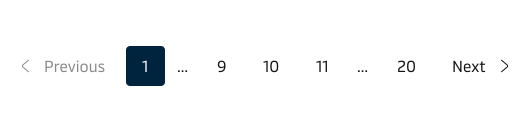
The pagination component uses truncation to hide the least important pages when the amount of pages exceed what is reasonable to display.
Redaction of sensitive information
Truncation can also be used for hiding sensitive information, such as email addresses and personal identification numbers. This practice of obfuscating (parts of) informations by replacing characters with dots or asterisks is called redaction. Using truncation for this purpose comes with an additional security measure by obfuscating the amount of characters in the sensitive text string.
an…ersk.com
16…62
1609634862
Note that the minimum of four untruncated characters does not apply when using truncation for redaction purposes.
Drawbacks and alternatives
Truncation is not the only method for dealing with overflow, and hiding information from the user can be problematic. So consider whether some of the methods below might be a better option.
- Wrapping is the default way of handling text overflow. Simply letting the text break and continue on multiple lines is often preferable from a usability perspective since it preserves all the content that the user might find useful.
- Abbreviating a text label to make it fit the allotted space is a simple but risky solution to avoid truncation. Make sure the abbreviation is widely accepted and understood among your users
- Fading out the end of a text can be an elegant and efficient solution in certain cases. The main advantage of this approach is that it doesn’t replace characters like the ellipsis. However the readability of the extra visible characters will be affected by diminishing contrast.
- Using an icon to replace a label can be an acceptable solution in cases where the icon/action combination is highly conventional (e.g. an X to mean ‘close’ or a recycle bin to mean ‘delete’). Read more about icon best pactices.
Loss of content control
Truncating text strings (especially those with dynamic content) comes with a loss on control of exactly what is shown to the user and the risk of cutting off words in awkward places. Consider the alternatives if you are worried that your users might feel offended by some accidental profanity.