Tooltip
A tooltip is displayed when the user hovers or focuses on the element that the tooltip describes.
Best practice
- The tooltip should always be placed in close proximity to the element it describes.
- Only use a tooltip when additional information is needed to understand the UI.
- Use tooltips to describe the difference between very similar elements.
Usage
A tooltip component is a user interface element that displays a short message when the user hovers over, focuses on, or taps an element (e.g. icon or text). The message usually provides additional information or guidance about the element, such as its function or purpose. A tooltip component can be used to enhance the usability and accessibility of a web page or application.
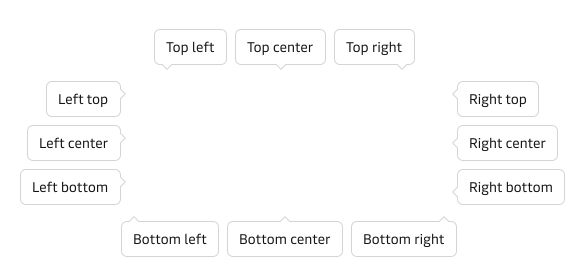
Positions
Use within text
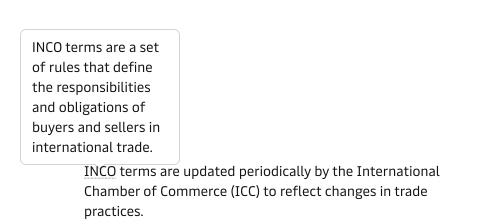
Use tooltip when the element has a label that is not clear or descriptive enough, and you want to explain what it does or what it means. For example, use a tooltip component to show the full name of an acronym, the definition of a term, or the description of a feature.
Use with non-text elements
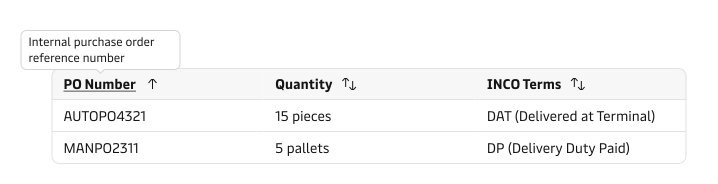
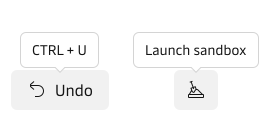
Tooltip can also be used when the element has no label at all, and you want to provide a hint or instruction to the user. For example, use a tooltip component to show what action will be performed when the user clicks on an icon, what information is required in a form field, or what keyboard shortcut is available for an operation.
Tooltip content should only be supplementary and not information that is needed for the completion of the user journey.