Link Button
Best practice
- Use link buttons for navigation within an app or website and other URL-change actions.
- Link buttons can be used for important stand-alone links in the UI, e.g. a “Register” link.
- Use clear and descriptive labels so the user understands the destination of the link.
- The purpose of the link button should be understandable from the label alone.
- Avoid ambiguous and vague labels that are open to interpretation.
- Labels should be sentence case.
- Always make sure that the link button is the best-suited option.
We recommend that you read our label guidelines for more information on how to write good Labels.
Usage
While regular buttons typically are used for on-page actions, link buttons are used for navigating within an app or website.
Primary
The link button can be used to highlight the most important links that lead the user forward through the main user journeys of the website or application.

Secondary
The link button can also be used for less critical, but still important links that sometimes have a CTA-quality to them. These buttons should be less visually prominent and it is recommended to use the outlined button style for these.
In-page URL changes
The link button can also be used for in-page navigation, where the link button links to a specific section within the page. Examples of this could be a table of contents or showing/hiding specific sections of the page.

Icons
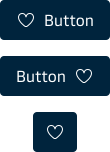
Like the regular buttons, the link button can contain an icon, either one to the left or one to the right side of the button label. It is also possible to have an icon-only button.
Icon-only accessibility
For icon-only buttons, an ARIA-label is automatically added to ensure that users using screen readers can understand what the buttons do. It is therefore very important that we always add a clear and descriptive label to all our buttons.