Textarea
Best practice
- Use natural language when writing form labels.
- Use the help text to show the character count and place it to the right.
- Error messages should be clear, concise and should provide actionable remedies to resolve the errors.
- The label should describe what to input and not how.
- Use natural language and use the terms that the user would expect.
- Don’t use verbs like enter, add, input etc in the label.
- Don’t add a colon ( : ) at the end of the label.
- Use the help text to provide additional context and explanation.
We recommend that you read our form design guidelines. The Guidelines cover many basic recommendations to be taken into consideration when working with forms.
Label
By default, the component has a top-positioned label. It is possible to change the position of the label to be left-positioned. We recommend that you use the top-positioned labels wherever possible, especially in forms. You can read more about why we recommend top-positioned labels in our form guidelines.
For information on how to write good and consistent labels - see our Label Guidelines.
Placeholder
Do not use the placeholder to replace labels. Unlike labels, placeholder text is optional and should be used with care since it disappears when the user starts typing. If the information is crucial, then use the hint text instead.
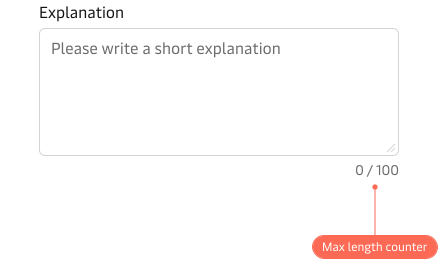
Max length counter
Use the max length counter to provide the user with information on how many characters the textarea accepts as well as giving the user immediate feedback on how many characters that has been entered as they type.
Hint text & error state
Please see the Input component for details on hint text and error state.
For more information on hint text and help in general see our form design guidelines.